Training is No Longer Complicated
Xert changes how cyclists plan, execute, and track fitness by making complex metrics easy to understand. If you want a system that blends adaptive workouts, clear visual feedback, and coachable progression without the noise, Xert delivers. This guide walks through the essential features, explains the key metrics, and shows how to turn data into better days on the bike.
“training is no longer complicated.”
Table of Contents
- Why Xert
- Home screen: everything you need in one view
- Today’s advice and the Adaptive Training Advisor
- Choosing and starting a workout
- Understanding MPA and smart intervals
- Progression: XPMC charts and training load
- Threshold and fitness breakthroughs
- Strain, focus line, and intensity balance
- Planning and the calendar
- Practical coaching tips when using Xert
- How to interpret change over time
- Putting it into a simple workflow
- Key terms and what they mean
- Summary: What makes Xert essential
- Next steps
Why Xert
The promise of Xert is straightforward: remove confusion and give riders actionable guidance. Rather than burying you in charts and jargon, Xert uses color coding, simple graphs, and a star-based difficulty system so you can make training choices that match your current fitness and fatigue.
Three core principles that drive Xert :
- Clarity. Visual cues (stars, colors, charts) show status at a glance.
- Adaptation. Daily advice and an adaptive training advisor tailor workouts to current form.
- Actionable workouts. Exercises that map to real-world efforts and can be played on devices like Garmin, iPad, or Android.
Home screen: everything you need in one view
The home screen in Xert is designed to answer two simple questions: What is my current status? What should I do today? It compresses critical information into a single dashboard so choices are obvious rather than overwhelming.
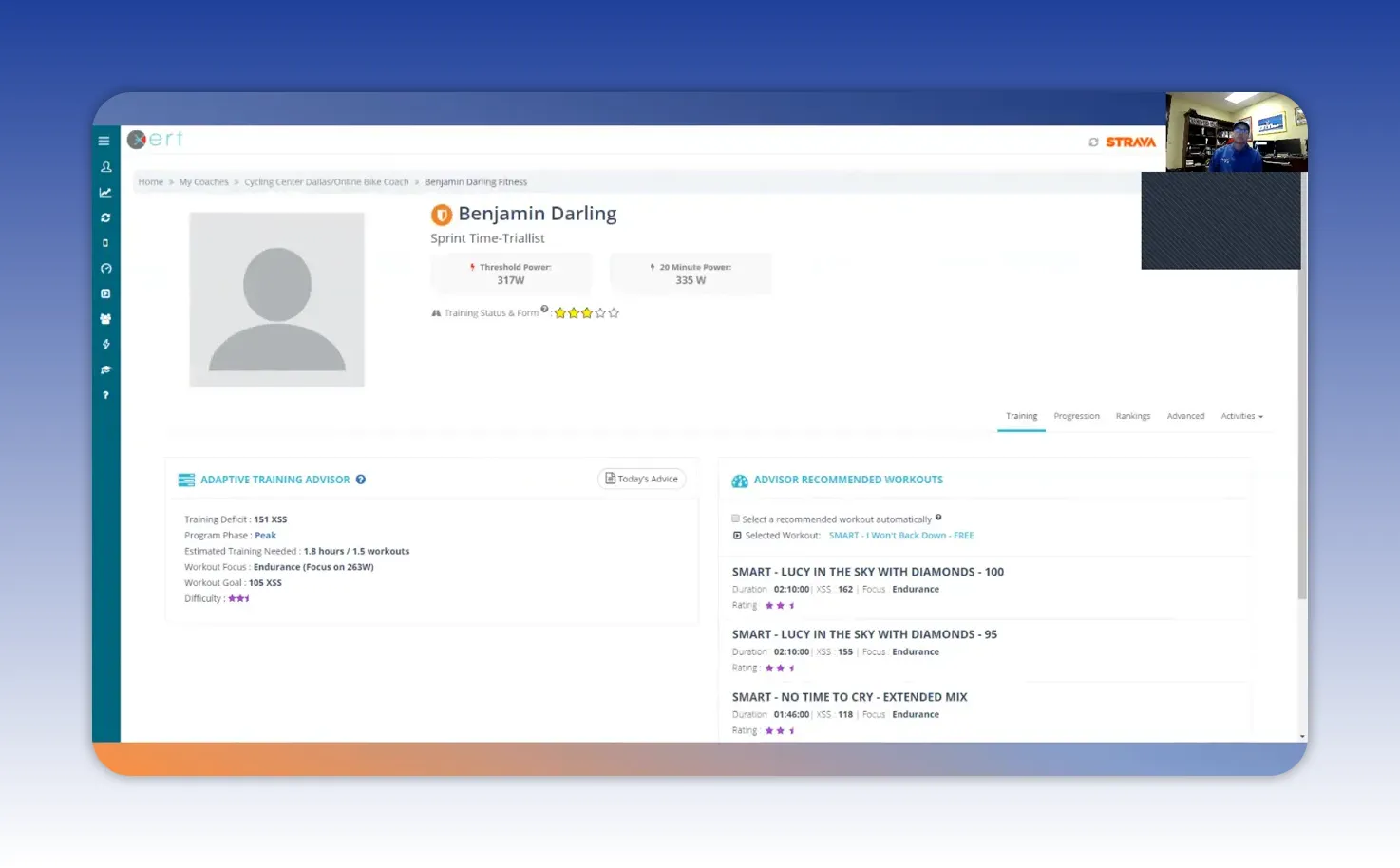
Key items to notice on the home screen:
- Type of cyclist — A simple label showing the focus (for example, 20-minute time trial specialist).
- Threshold power — The gold line that separates aerobic efforts from higher intensity work.
- Focus wattage — The current power focus for training sessions (what the athlete should be practicing).
- Stars and colors — A quick rating of training status (stars) and fatigue (star color).
Those stars and colors matter: three stars means competitive and well trained. The color tells you if you are fresh or carrying chronic fatigue. This lets you make better decisions about when to push and when to back off.
Today’s advice and the Adaptive Training Advisor
The Today’s advice button is the quickest way to get a usable plan for the day. Instead of reading a long paragraph, look for the condensed recommendation: a workout difficulty (stars), the suggested focus (endurance, threshold, etc.), and a target strain score.
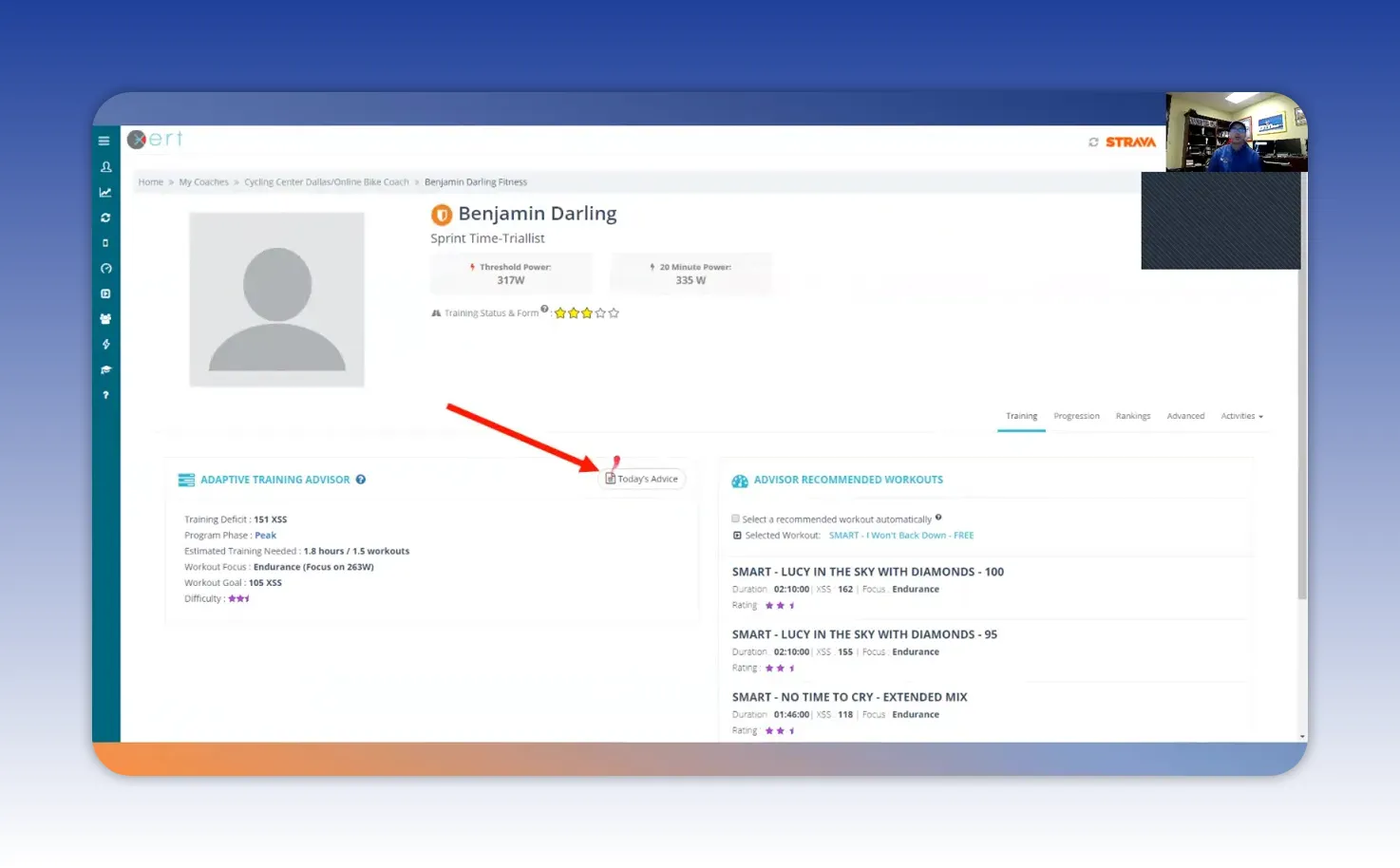
How to read that recommendation:
- Stars indicate session difficulty. Choose workouts that match or are slightly below your star recommendation when fatigued.
- Strain score (XSS) gives the target training stress for the session. Aim to hit that XSS to match your training load goals.
- Focus relative to threshold shows whether the session is aerobic or includes higher intensity work.
The adaptive advisor also knows your upcoming A races and taper windows, so it balances pushing for gains with managing fatigue. In practice, this keeps training purposeful—especially leading into key events.
Choosing and starting a workout
Workouts in Xert are listed with several helpful labels that make selection fast: stars, duration, XSS, and focus. When choosing, match the workout’s stars and XSS to the advisor’s recommendation and your available time.
Example selection logic:
- Pick the star level the advisor suggests.
- Match the XSS close to the target strain score (within ~10%).
- Choose a duration that fits your schedule and still hits the XSS target.
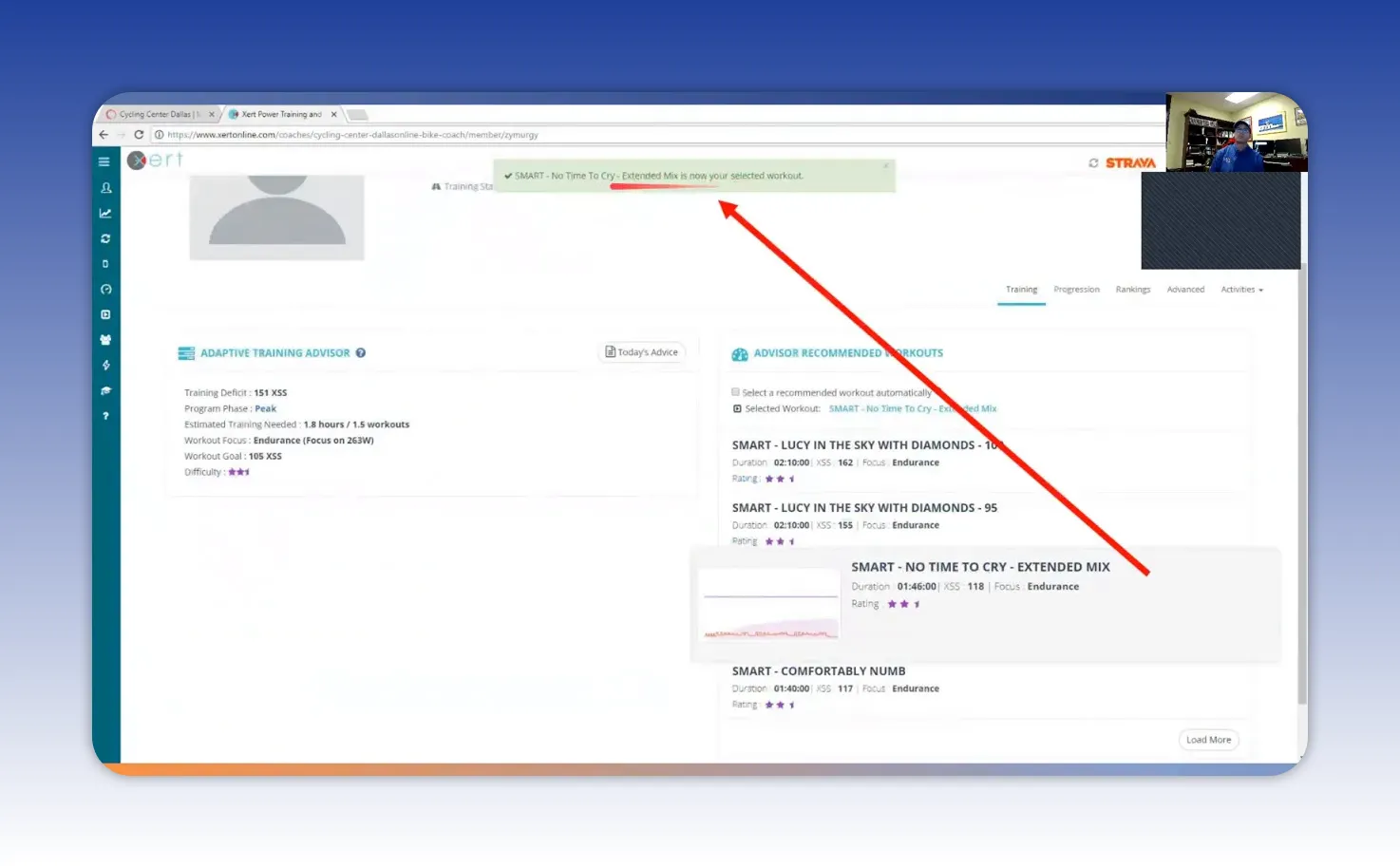
Once selected, you can send the workout to a player on Android, iPad, or Garmin. The interface is simple: increase or decrease power to stay on target, follow gear and cadence suggestions, and watch your MPA feedback to pace efforts intelligently.
Understanding MPA and smart intervals
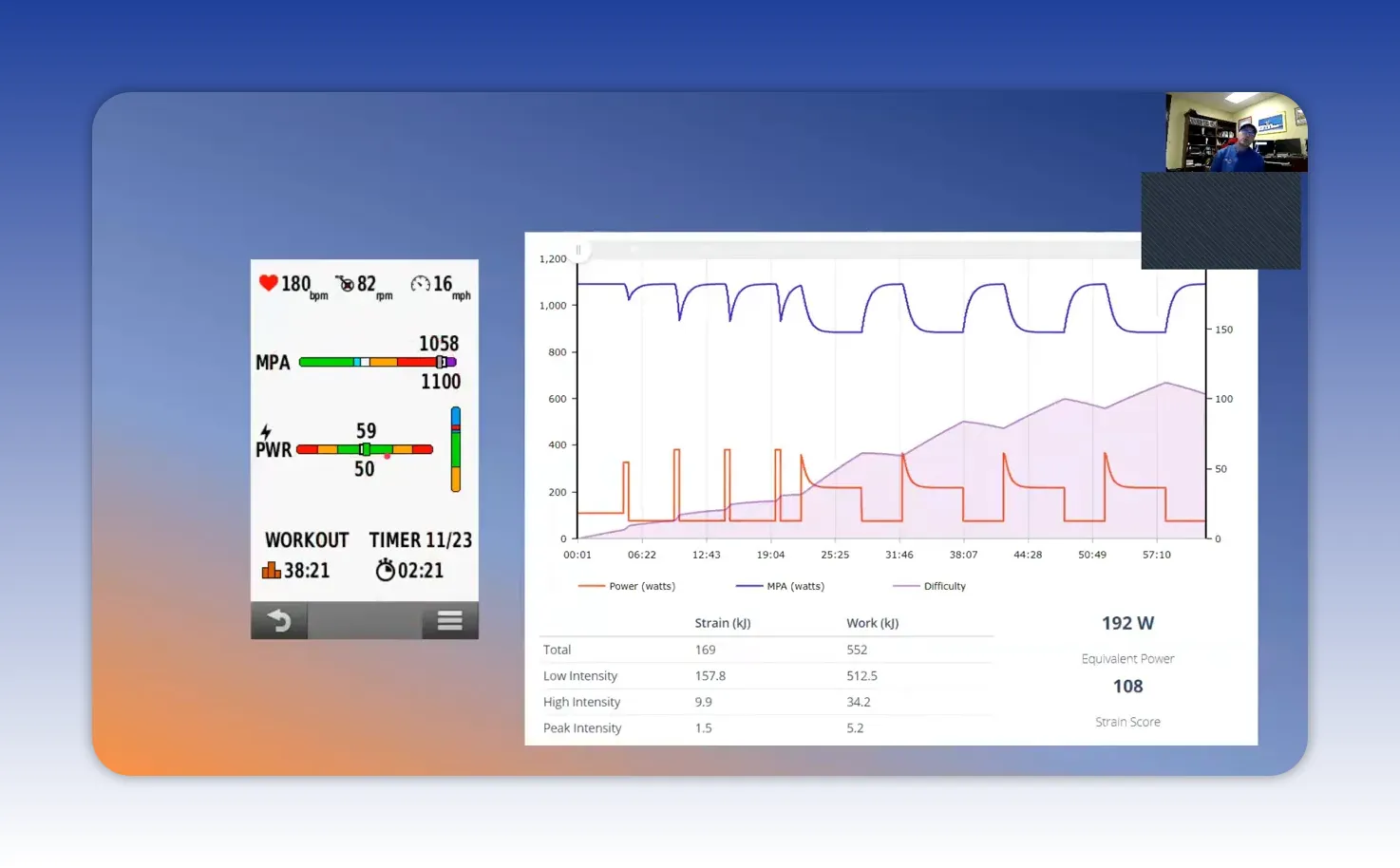
Maximum Power Available (MPA) is one of Xert ‘s unique coaching tools. It estimates the highest power your body can produce at any moment and updates continuously. Using MPA you can pace intervals to avoid blowing up or, when needed, push into optimal fatigue zones.
How MPA informs workouts:
- Smart intervals draw down MPA in a controlled way then allow recovery so the interval set remains productive.
- Warm ups and pick-me-ups can be structured to gradually challenge MPA then recover, building capacity without excessive fatigue.
- Player displays show MPA peaks and current available MPA so you can make micro-adjustments on the fly.
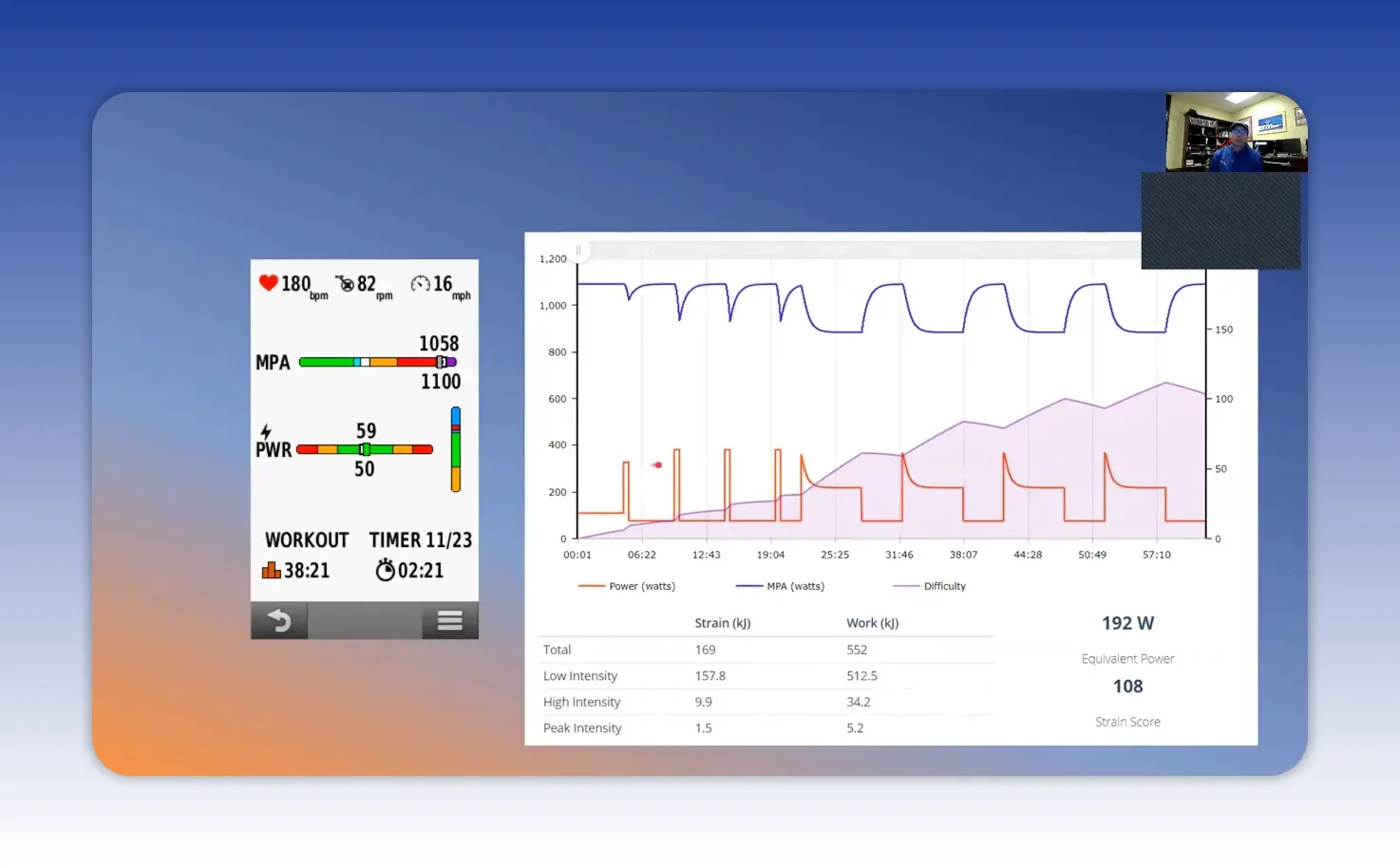
Smart intervals are built to tax specific energy systems and then return you to a recoverable state. You avoid arbitrary all-out efforts and instead do targeted stimulus that accumulates into performance breakthroughs.
Progression: XPMC charts and training load
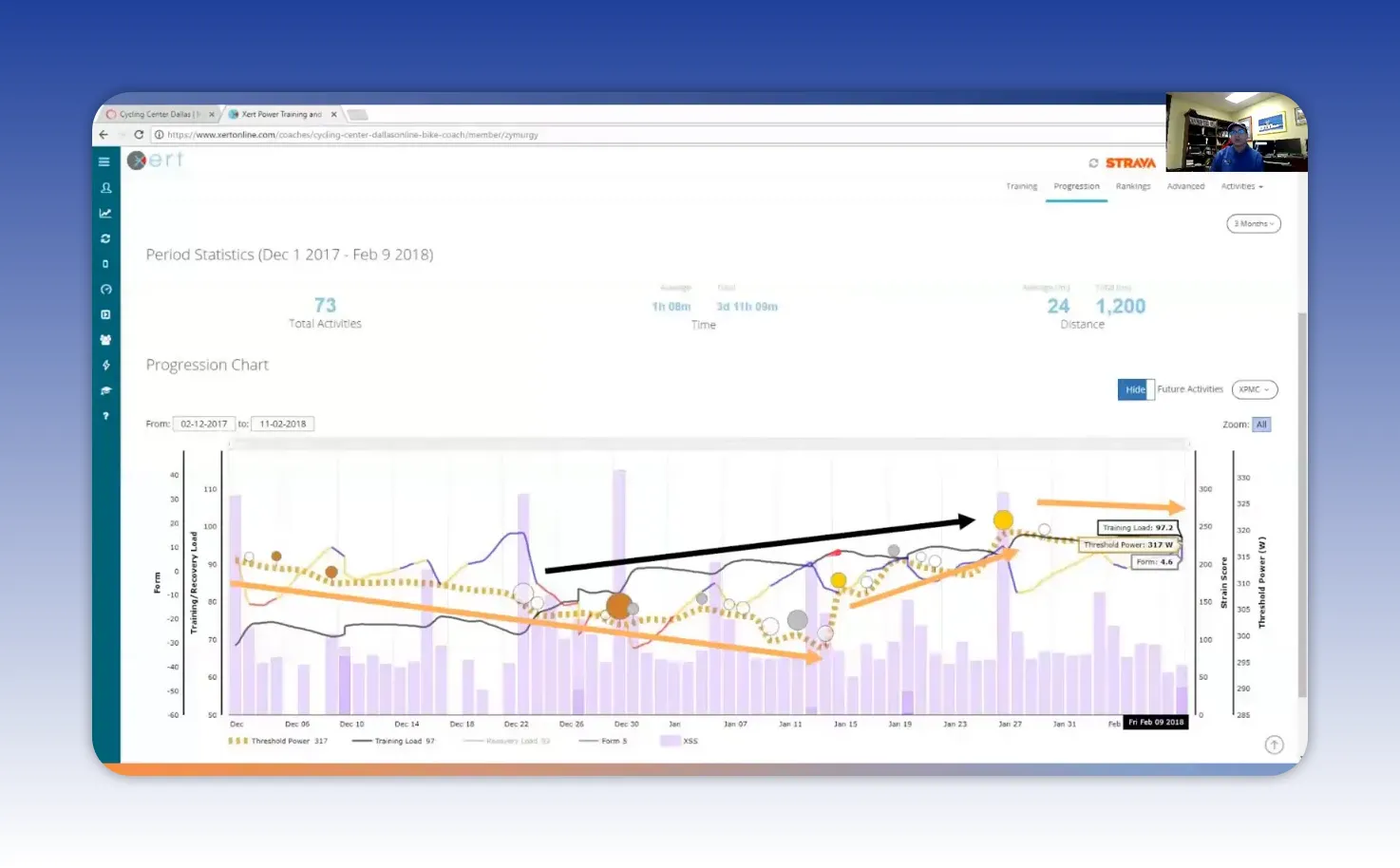
Progression tracking is where training moves from guesswork to evidence. The XPMC progression chart offers a rolling window of key metrics like training load, form, threshold, and daily XSS.
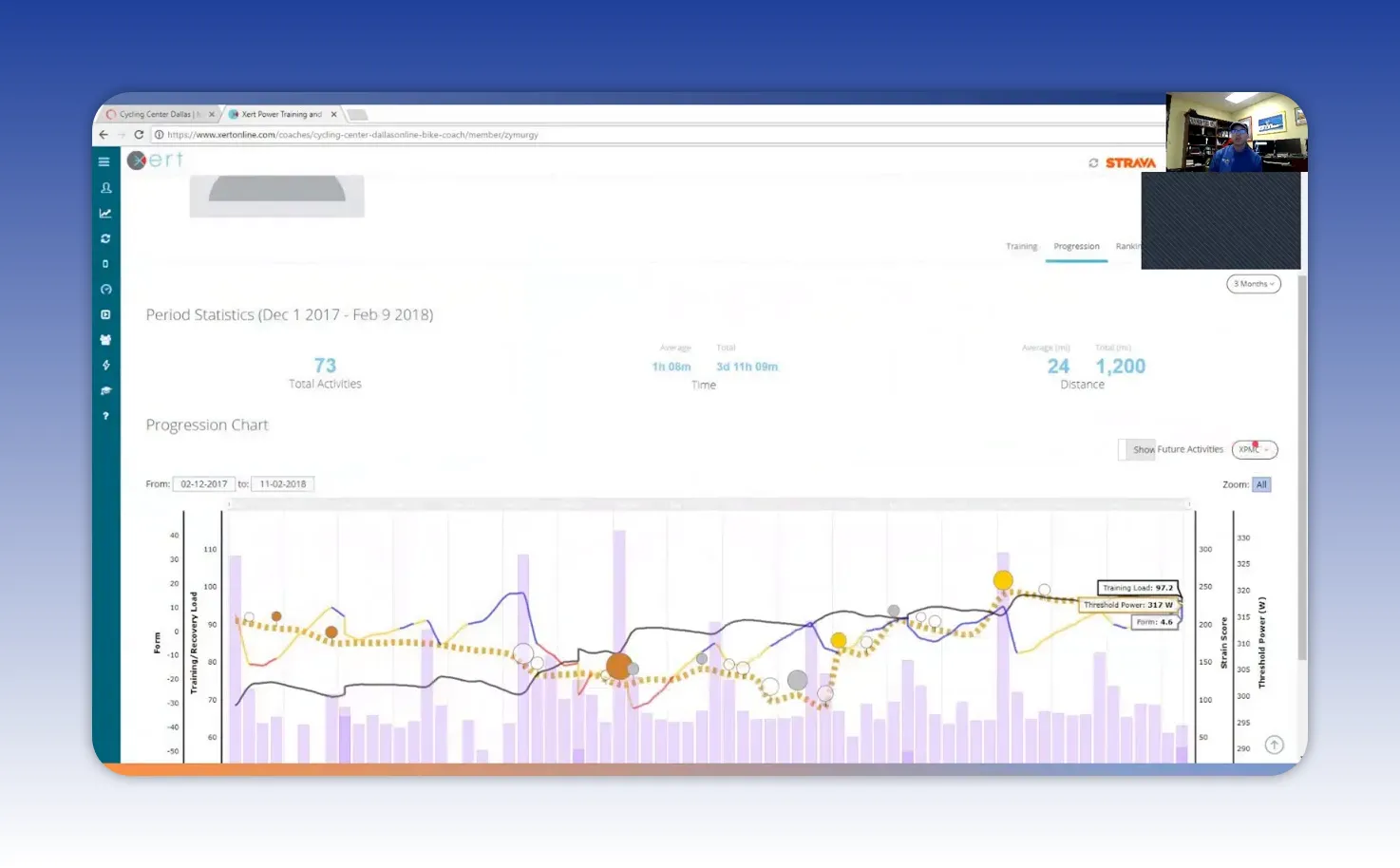
Read the chart this way:
- Purple columns = daily XSS (one column per day).
- Black line = training load, an aggregated measure of how much fitness you are maintaining.
- Trend direction matters more than daily noise. A rising black line means sustainable fitness gains.
An athlete’s training load might be 97 points, which practically means you need roughly a 97 XSS ride to maintain it. If a planned workout is 118 XSS, expect the training load to rise slightly and fatigue to increase accordingly. That trade-off is intentional when seeking breakthroughs.
Threshold and fitness breakthroughs
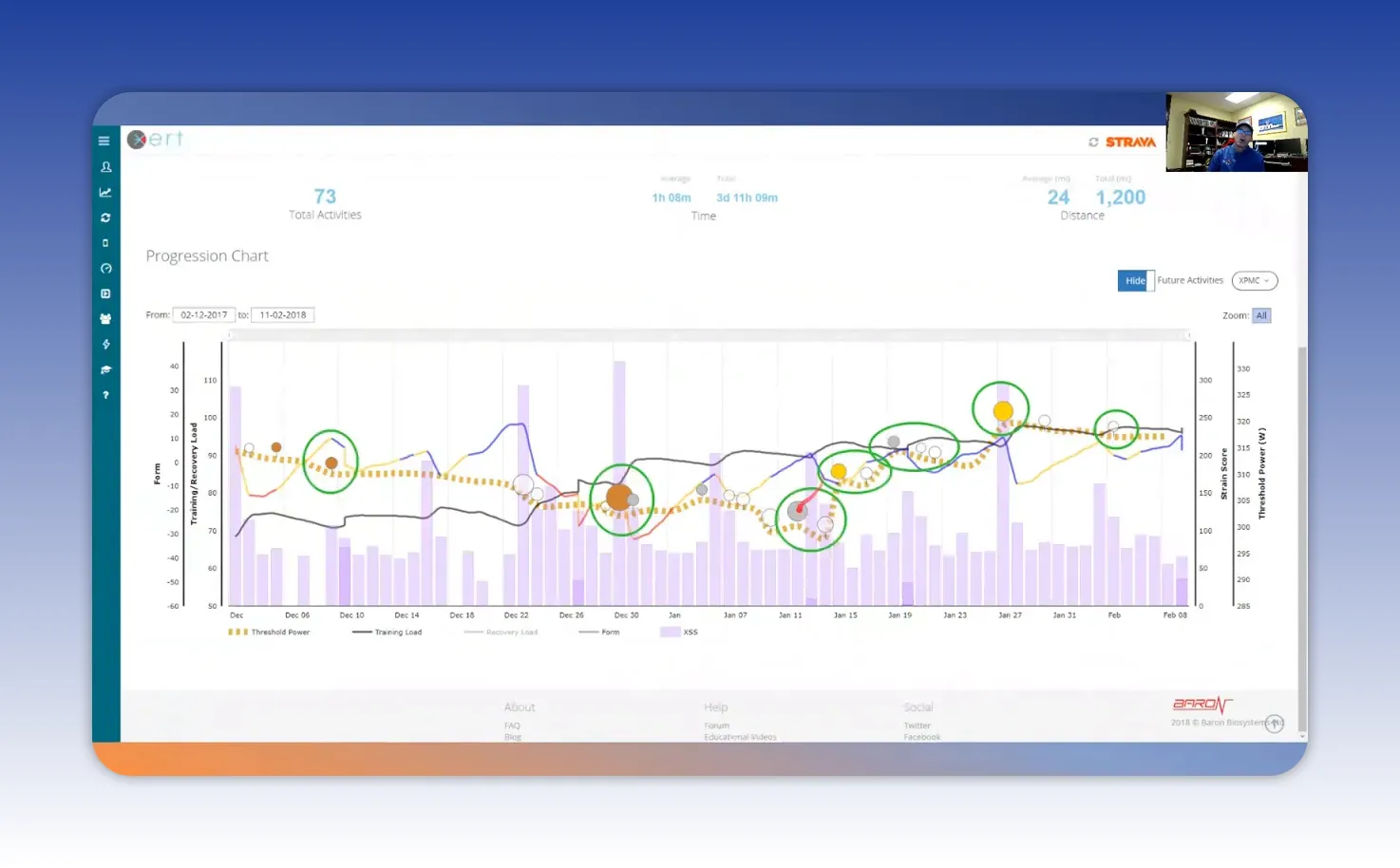
Threshold is the dividing line between long, steady efforts and shorter, higher-intensity efforts. Below threshold you can ride for hours; above it you can ride for minutes.
Xert flags fitness breakthroughs—moments when you improve Functional Threshold Power, Max Power Available, or anaerobic capacity. These are plotted as colored dots along the progression so you can see exactly when and why gains occurred.
Power color coding offers contextual detail during efforts:
- Green: aerobic zone
- Blue: tempo
- Black: threshold
- Yellow: VO2 max
- Red: full anaerobic
- Purple: elite sustained power which can earn a gold medal ribbon on the interface
Tracking these changes helps you learn which sessions lead to real adaptations rather than just hard days that don’t translate to performance.
Strain, focus line, and intensity balance
Strain measures physiological response to stress. Where stress is the external load, strain is how your body reacts. Xert breaks strain into low, high, and peak categories so you can track both volume and intensity composition of rides.
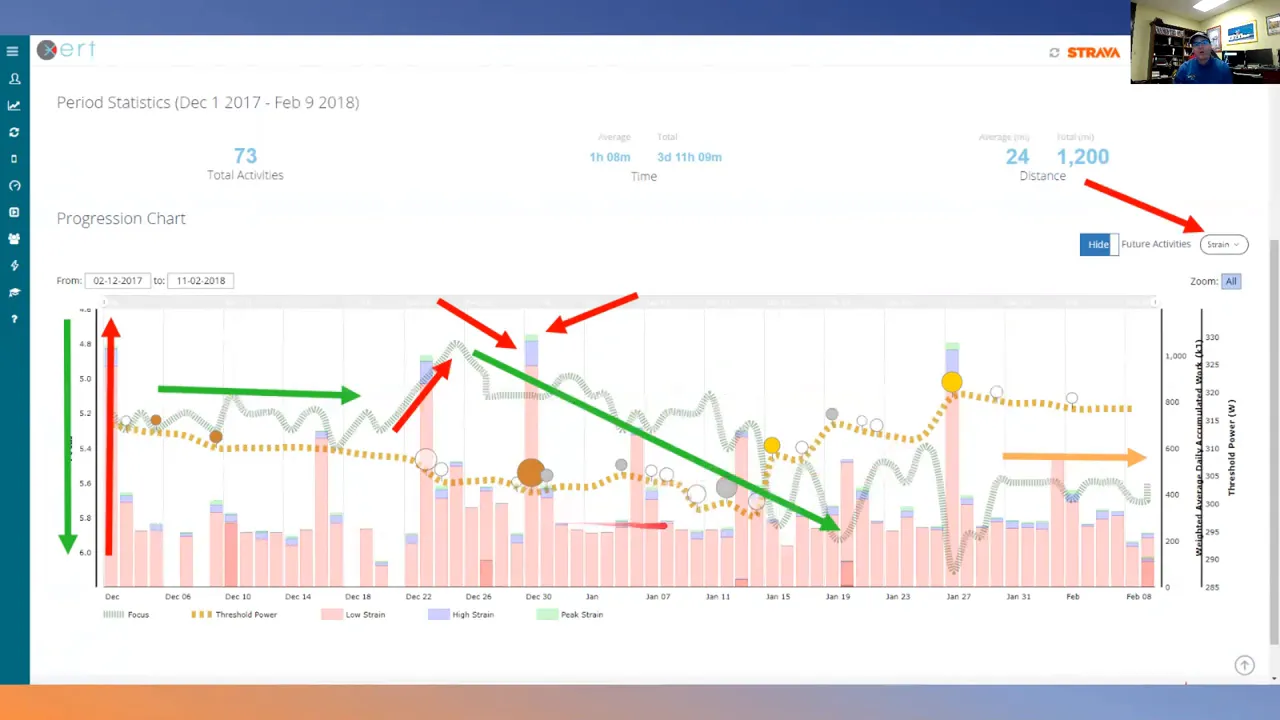
The focus line overlays the strain chart and represents the session’s intensity focus. A lower focus value indicates more aerobic emphasis. As focus moves toward zero, intensity increases and sessions include more high-strain work.
Example analysis:
- A ride with 921 kilojoules in low strain and 128 kilojoules in high/peak means the day was predominantly aerobic with targeted high-effort blocks.
- Use the ratio of high/peak to overall volume to manage training polarity. A good target is around 90% low strain, 10% high/peak early in a base block and up to 80% low, 20% high closer to race sharpening.
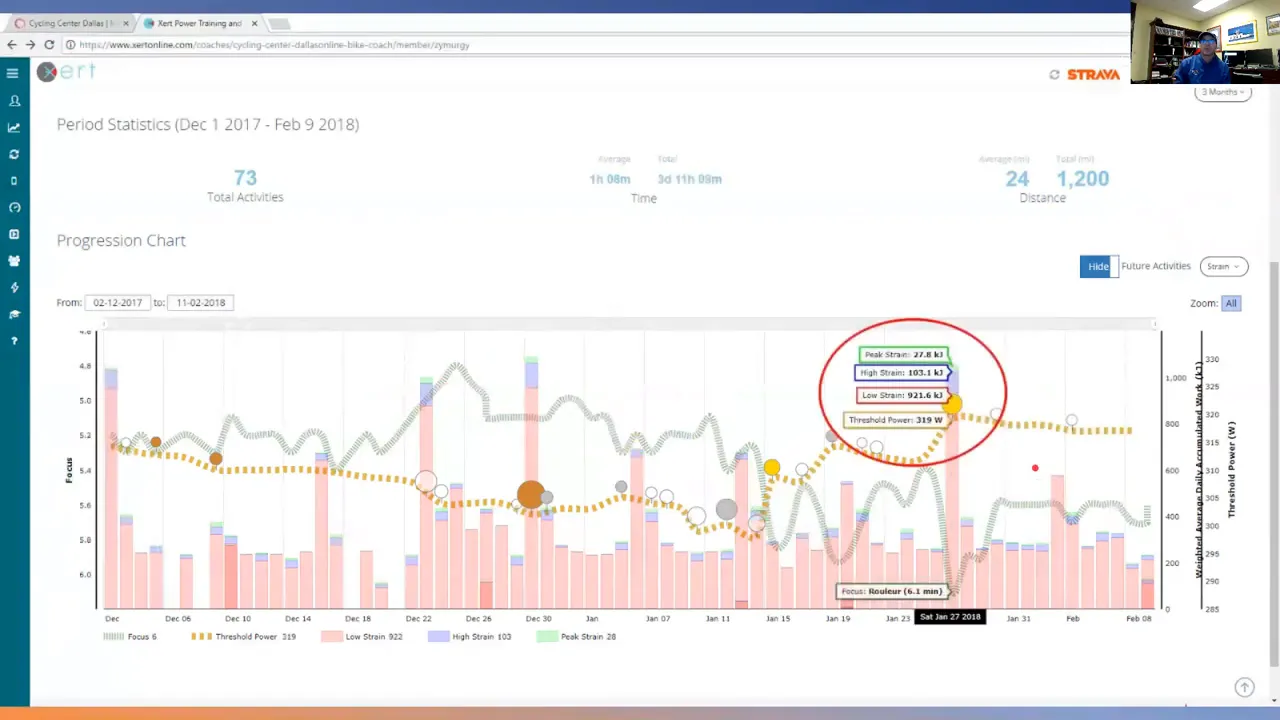
That intensity ratio is an easy rule of thumb to avoid too many hard days that erode fitness rather than build it.
Planning and the calendar
The training planner in Xert makes scheduling intuitive. Starred workouts show up in a pool, and you can drag them into the calendar. The planner updates star colors and counts to reflect how the change alters your upcoming load and fatigue.
Weekly stats summarize the practical outcomes of planning:
- Hours per week (useful for time-constrained athletes)
- XSS per day and weekly totals
- Training load and threshold changes
- High-intensity energy and peak power score
These columns are customizable. Adding metrics like polarity ratio helps coaches and athletes focus on balance rather than absolute numbers.
Practical coaching tips when using Xert
Xert works best when combined with simple coaching rules. Here are practical habits to adopt:
- Follow the advisor but be smart. If the advisor suggests endurance and your legs feel trashed, choose a lower-star session that hits the target XSS.
- Match XSS to training goals. Use target strain scores to decide workout length and intensity rather than guessing what “hard” means.
- Use MPA to pace intervals. Watch MPA during smart intervals to avoid redlining or to seize opportunities when MPA is high.
- Track breakthroughs. Review colored dots and breakthroughs after hard blocks to understand what training stimulus caused gains.
- Balance intensity with polarity. Aim for mostly low-strain volume with strategic high and peak strain sessions to force adaptation without chronic fatigue.
- Customize focus to your terrain. If your rides include rolling hills and surges, set a focus of 3–6 minutes rather than strictly chasing a 20-minute metric.
How to interpret change over time
Long-term progress is visible in trends, not day-to-day spikes. A few rules to read progress charts effectively:
- Look at the slope of the training load line. A steady upward slope indicates sustainable gains.
- Watch threshold movement and breakthroughs. Breakthrough clusters often follow planned blocks containing the right mix of high and low strain.
- Correlate fatigue colors with recent load. If star color shows chronic fatigue, consider lowering weekly XSS targets for recovery weeks.
Putting it into a simple workflow
Make Xert part of a repeatable weekly routine:
- Check the home screen each morning to see current form, star color, and recommended difficulty.
- Open Today’s advice and note the target XSS and focus.
- Select a workout that matches stars, XSS, and available time. Send it to your device.
- Use MPA and the player display to pace intervals and pick-ups.
- Review progression charts weekly to adjust upcoming block targets and ensure polarity balance.
Key terms and what they mean
- Threshold — the average power below which efforts are aerobic and sustainable for hours.
- Training load — aggregated measure of how much fitness you are maintaining.
- XSS (Xert Strain Score) — a unit of training stress used to compare workouts.
- MPA — maximum power available at any moment, used for pacing and interval control.
- Focus — the characteristic duration or intensity emphasis of training (e.g., 5-minute focus for rolling surges).
- Breakthrough — recorded increases in threshold, MPA, or anaerobic capacity.
Summary: What makes Xert essential
Xert is not about hiding complexity; it is about translating complexity into decisions you can act on. The platform ties daily advice, playable workouts, MPA-guided pacing, and clear progression charts into a single loop that supports measurable gains.
Use Xert to:
- Make daily training decisions with confidence.
- Target the exact stress needed to hold or change training load.
- Understand which sessions create breakthroughs and which just create fatigue.
- Plan and adjust training around real-life constraints without losing direction.
Next steps
Start by spending a week using the home screen and Today’s advice. Pick workouts that match the star recommendation and hit the XSS target. Track your MPA during sessions and review the progression charts after each week. Small, consistent application of these tools will quickly produce clearer training choices and better performance results.
Xert is a powerful ally for riders who want measurable improvement without getting lost in data. Use the tools, respect the recovery signals, and let the color-coded clarity guide your next block of training.