Garmin Connect Has A Sleep Tracker That Can Help You Optimize Sleep and Recovery!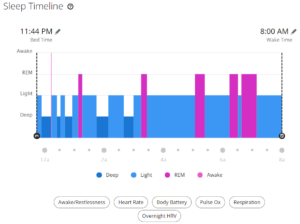
How to Use Garmin Connect Sleep Data to Improve Cycling Performance
Most cyclists think about sleep only when it goes wrong. You feel flat on the bike, intervals sting more than usual, and motivation dips. The instinct is to look at training—FTP, volume, intensity. But more often than not, the real limiter is recovery. And recovery starts at night.
That’s where Garmin sleep tracking for athletes delivers real value. Not as a gimmick, and not as a score to chase, but as a way to protect training gains and improve consistency. This article pairs with the video above to show how sleep data from Garmin can directly support better performance on the bike.
The Garmin Connect Ecosystem is RICH with features that are either underutilized or perhaps misunderstood. Garmin Connect, when paired with any of several Garmin wrist units, can track sleep quality, sleep quantity, sleep
disruption, pulse oximetry, breaths per minute, and overall
time. You can set goals for sleep quantity and identify trends that may help you sleep better, deeper, or longer. Garmin estimates sleep using heart rate, heart rate variability, moveme
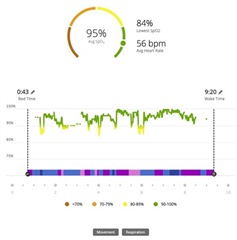
nt, and breathing rate. On supported devices, Garmin Pulse Oximetry Sleep adds overnight oxygen saturation. The benefit isn’t precision—it’s perspective. When you track these metrics consistently, Garmin Connect starts to show how well your body is actually absorbing training.
The biggest advantage? Early warning. When sleep duration trends downward, or restlessness creeps up, Garmin often flags recovery strain before power numbers fall. That gives you time to adjust—fuel better, sleep longer, or ease load—before fatigue becomes a problem.
Athletes often fixate on Sleep Score, and understandably so. It’s simple, visible, and easy to compare. The real benefit of Sleep Score is context. It blends sleep duration, stress, restlessness, and sleep stages into a single snapshot. Used properly, it helps you gauge readiness. Used alone, it can be misleading. If you want a deeper explanation of what that number actually represents and how to use it intelligently, this article breaks it down clearly:
👉 https://onlinebikecoach.com/garmin-metrics-101-sleep-score/
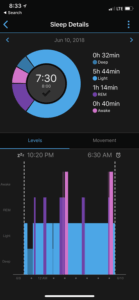
Where Garmin really shines is in its deep sleep and REM sleep tracking. Deep sleep supports physical repair—muscle recovery, immune function, hormone regulation. REM sleep supports learning, coordination, and emotional recovery. For cyclists, the benefit is simple: stable sleep stages usually mean a stable training response. When deep or REM sleep starts trending down, it’s often a sign that recovery is lagging behind workload.
Breathing rate and oxygen saturation add another layer of benefit. Garmin sleep breaths per minute tend to stay remarkably steady when recovery is on track. An unexplained rise often shows up alongside illness, dehydration, or accumulated fatigue. Pulse oximetry is especially useful for altitude adaptation, but even at sea level, it can help highlight disrupted sleep over time.
This is why Garmin sleep trends matter more than any single night. One bad sleep doesn’t ruin a training block. A pattern of poor sleep will. Garmin Connect helps you spot those patterns early, which means fewer forced rest weeks and more consistent progress across the season.
If you’re wondering how to use Garmin sleep tracker data actually to ride better, focus on the benefits, not perfection. Use sleep trends to set expectations for the day, not to cancel workouts automatically. When sleep is trending well, you can train with confidence. When it’s trending down, you can adjust before fatigue shows up in power data. Athletes often ask how to optimize sleep with Garmin Connect. The biggest performance benefits usually come from boring fundamentals: consistent bedtimes, adequate fueling after evening rides, and respecting early signs of overload. Garmin doesn’t replace good habits—it reinforces them.
Nearly every modern Garmin device supports sleep tracking, and the best Garmin watch for sleep tracking is the one you’ll wear every night. Comfort and consistency deliver far more benefit than chasing the latest sensor upgrade. Sleep won’t magically raise your FTP. But it determines whether your hard work actually turns into fitness. When you use Garmin Connect sleep features the right way—focusing on trends, recovery, and readiness—you spend more days training well and fewer days digging out of fatigue.
That’s the real benefit. More good rides. More consistency. Better results.