
Xert Garmin Fields laid out in order of importance on my Xert Road Profile on my Garmin 1030.
This is how I set up Page 1 of my Xert Garmin Fields for my road bike. I don’t use all of them on the first page, but these are the ones I have found to be most important when I cycle.
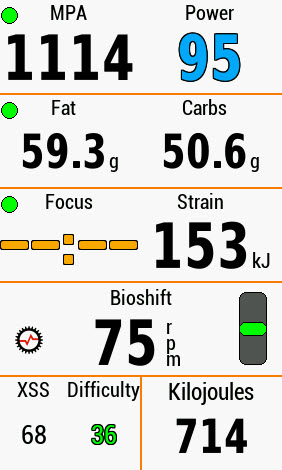
Line 1: Xert Garmin Fields – MPA and Power.
- MPA (“Maximum Power Available”), which is your sprint power at any given moment, in case you get chased by scythe-wielding zombies.The other metric is POWER in WATTS. This is one of the Most Important Xert Garmin Fields!
- If it’s BLACK, it’s SUPER EASY.
- If it’s BLUE, it’s AEROBIC.
- If it’s GREEN, it’s Tempo.
- If it’s YELLOW, you’re at Threshold and you’re on borrowed time and your MPA is dropping.
- If it’s ORANGE, your MPA is dropping quickly, and you have LESS THAN 3 MINUTES of HIE (High Intensity Energy in KiloJoules), before you have X’s over your eyes.

Utter Exhaustion On A Bike Can Have Serious Consequences - If POWER is RED, you have less than THIRTY SECONDS before you are utterly and completely exhausted.
- AND IF POWER IS PURPLE – Well, you’ve defied the Gods and you’re BREAKING THROUGH TO A NEW FITNESS SIGNATURE! YEA!!
Line 2: Xert Garmin Fields – Fat and Carbs.
- I use this as Line 2 of my Xert Garmin Fields Page.
- IF FAT and CARBS are BOTH BLACK, and you’re riding in BLUE on POWER, you’re burning almost ALL FAT.
- IF FAT is RED and CARBS is BLACK, you’re riding in the FAT BURNING ZONE, and your Power will be BLUE or GREEN.
- IF FAT and CARBS are BOTH BLACK, and you’re riding in GREEN on POWER, you’re burning EQUAL AMOUNTS OF FAT AND CARBS PER KILOJOULE OF ENERGY.
- And finally, if CARBS are RED, you’re either at or above your Functional Threshold Power, and most of your energy is coming from Carbs. You’re still going to burn some fat, but it’s less and less as intensity grows or MPA falls.
Line 3: Xert Garmin Fields – FOCUS and STRAIN
- This is one of the most important Xert Garmin Fields! Learn to Love it!
- FOCUS means this… ALL of the energy you use, be it 50 watts as you roll out of the parking lot, 200 watts climbing a hill, or 600 watts as you outrace a rabid coyote, will be counted towards FOCUS. The more INTENSITY you put in to the ride, the “LOWER” the FOCUS. If you ride easily, FOCUS will trend “HIGHER“.
IT IS COMPLETELY REVERSE OF WHAT YOU MIGHT THINK.
AN INTENSITY OF “00:00” is INFINITELY HARD, and AN INTENSITY OF “59:59” or in this case, “–:–“, is INFINITELY EASY.
A FOCUS of 4:00 is harder than a FOCUS of 8:00.
But it gets better…
If the FOCUS Xert Garmin Field is:
-
-
- ORANGE, then the FOCUS is PURE, which almost always means you’re riding WELL BEYOND the “–:–“ value, and it’s all Base, Zone 1, Zone 2, LSD, whatever you want to call it.
- GREEN, then the FOCUS is HEAVILY POLARIZED. The Hard Stuff is HARD, and the Easy Stuff is EASY. This works both acutely and empirically. You can “Polarize” a ride, or you can “Mix it Up”.
- BLACK, then the Focus is SOMEWHAT POLARIZED, but it’s still pretty good. There was more “Hard Stuff”, but not so much that it threw a training plan out the window.
- BLUE, well, you were in a group ride, and everyone was feeling good, and there was a lot of testosterone and gel patches, so…. it was a hodge podge mix of race sim and beat down. It’s not overly productive if Polarization is part of your FOCUS. Furthermore, most of my mountain bike rides are BLUE FOCUS, because it’s almost impossible to ride terrain without some intensity.
- STRAIN is a way to look at how a ride is affecting you. When you ride easily, Strain will grow, but slowly. If you increase your tempo, Strain will also increase faster. Hard Intervals raise STRAIN quickly. The eyeball effect for me is this: If STRAIN is below 150, I’m okay and I can recover and ride again, with little damage. If STRAIN is between 150 and 300, well, I’ll be tired the next day. If STRAIN crosses 300 and heads toward 450, I’m probably training or even racing a 100K style road race, and if STRAIN crosses 500, well, I’m probably going to need a day off, or two, or three. Keep an eye on STRAIN during the week, and on weekends, depending on the season, use STRAIN as a governor, or as a warning. High Strain is where mistakes are made, mentally and physically.*** STRAIN AND XSS ARE NOT LIMITED BY TIME. You can earn high numbers in short periods of time.
-
Line 4: Xert Garmin Fields – BioShift Cadence Optimizer
- I LOVE BIOSHIFT! I love it, I love it, I love it. It takes ALL of the mystery out of cadence, and basically helps you optimize power and gear combinations, automatically. I have NO IDEA how it works, other than I believe Xert is using torque numbers first instead of raw power, but trust me – it’s a free, easy, worthwhile investment, especially if you are into Time Trials or have to climb mountain passes. The Vertical Dial will help you STAY CENTERED on gear and power. It’ll also help you avoid dropped chains. However, it is NOT FOUND in an Xert Garmin Fields Search. Instead, it’s located HERE:
Line 5, Xert Garmin Fields – Part 1: XSS/Difficulty
- Well, after ALL THIS, we’re at the Xert Garmin Fields – XSS. It only goes UP as you ride, and it measures that sticky combination of Watts and Time to come up with a quantifiable VOLUME. Use it in conjunction with the Xert Adaptive Training Advisor Recommendations.
- Difficulty? Man – this is SOO UNDER-USED…
Difficulty is simply your PROJECTED XSS PER HOUR. That’s it. If it’s high, you’re working. If it’s low, you’re not. YOU CAN USE IT TO PACE YOURSELF OUT ON ROLLING TERRAIN OR ANYWHERE.If it’s GREEN? You’re BELOW YOUR Xert Equivalent Power (XEP), which is a type of Average Power that I honestly don’t use. If it’s BLUE, you’re above that Xert Exponential Power. That’s it. It’s GREAT for learning just how Work, works. Speaking of Work….
Line 5, Part 2: KiloJoules
- Line 5, Part 2: KiloJoules:
- KiloJoules are measurements of Energy, and they measure Watts Over Time. It’s PHYSICS. KiloJoules as a Measurement is BETTER than Calories, because it measures all the work, and not the coasting, that you do when you ride. Using KiloJoules is just a better way to roll, and you can tell yourself to eat or drink based on how many KiloJoules you’ve used over the course of a ride. It’ll also help you with warmup protocols and bonking. Again – I’ll try to blog about these independently.
Conclusion:
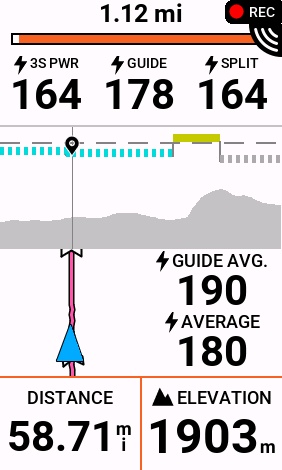
One Screen is all you need to properly set up your Xert Garmin Fields. You’ll notice that I just used one screen, and did not include things like Time, Slope, Sunset, etc. Those can all be added on different screens, and the Garmin 1030 (now the 1030+), is pretty much the end-all, be-all bike computer for modern needs. Sure, it’s big and expensive, but when your eyesight is as bad as mine, real estate matters. Feel free to mix and match the other Xert Garmin Fields on other pages. I’ll explain my “Breakthrough” page in another post.
Thanks for reading!
2 Responses
I learned a bit on BioShift when I was on the trainer last winter. I don’t think its quite as smart as you’re giving it credit for.
I think its more like looking at your average cadence for the last ~2 1/2 minutes and trying to keep you there.
I was doing cadence intervals while keeping power fairly level. Going from 80 to 100 to 120 to 60 and such, and holding those cadence steps for 4-5 minutes. (it was something to keep my mind on) What would happen as I made a big drop in cadence is BioShift would say I was WAY too low on cadence. Then, a bit over 2 minutes into the interval, it would suddenly change to green and ‘spot on’ for cadence. Same type of change when I increased cadence quite a bit.
(note that its been a year since I’ve played with BioShift this way, so memory of the time duration may be a bit off)
I think you’re right; from what I can recall, the BioShift looks at your rolling 10-minute average, and if the ‘gear’ is blinking, it’s learning a different cadence from usual. I THINK it’s also looking at torque, and I know there are good torque/cadence charts out there. I just think it’s important to realize that ’90 rpm’ isn’t a golden value for everyone, or even anyone. You have to find the ‘happy cadence’ that’s right for you, and that’s why gears and ratios might actually matter, as well as crank length.